XML merge tool for Mac
Merge XML files locally on Mac
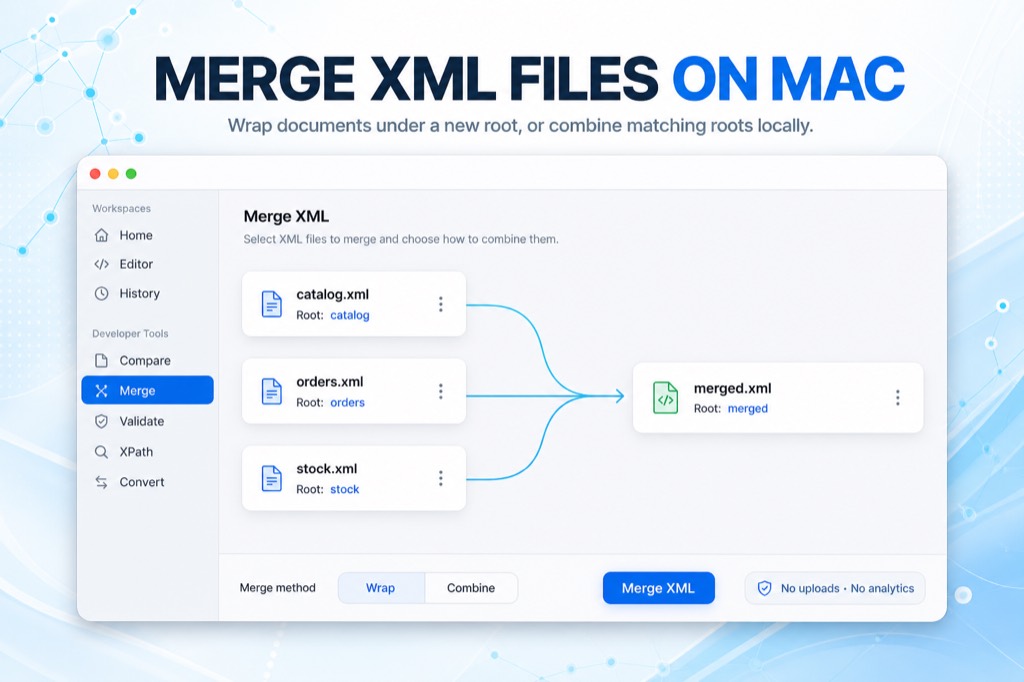
XML Lens merges two to five well-formed XML files on your Mac. Wrap every document under a new root, or combine children when the roots already match. Files stay in the order you choose, processing stays on-device, and nothing is uploaded.
Combine the files you already have
Open the Merge workspace, then drag XML files in or choose them from disk. Reorder the list so the documents appear in the merged output the way you need them. Each file is checked for well-formedness before it can be merged, with line and column diagnostics when a document fails.
Merge is built for catalogs, feeds, configuration fragments, and other local XML you need in one document—without pasting everything into a web tool.
- Add 2 to 5 well-formed XML files
- Drag files in or choose them from disk
- Reorder the list before merging
- See parse issues with line and column numbers
Wrap or combine matching roots
Wrap places each document under a new root element. The default wrapper name is merged; you can choose another valid XML name when a different root is more useful.
Combine appends each file’s children when every document already shares the same root. If a later file uses a different value for a root attribute, XML Lens keeps the first file’s value and shows a warning. Prolog and DOCTYPE declarations are stripped; comments and CDATA stay in the merged markup.
- Wrap: nest each document under a new root
- Combine: append children when roots match
- Conflicting root attributes keep the first file’s value
- Comments and CDATA are preserved
Review the result, then keep working
The merged document appears as pretty-printed XML you can scroll, copy, or save as merged.xml. Open it in the editor to format, search, inspect structure, run XPath, or explore Visual Map.
Compare remains a separate workspace: use it to highlight differences between two documents. Merge combines files into one document. Neither is a Git-style three-way merge with conflict resolution.
- Copy the result or save it locally
- Open the merged document in the editor
- Continue with Visual Map, XPath, or Compare
- XML content, filenames, and paths stay on your Mac
What merge is—and is not
XML Lens requires macOS 14.0 or later. Merge runs locally after the Mac App Store trial, then as part of the one-time Pro purchase. It combines well-formed documents; it does not resolve overlapping edits, merge XML like Git, or accept unlimited files.
Review the output before treating it as production XML. Combine requires matching roots. Wrapper names must be valid XML element names.
- Local processing with no uploads and no product analytics
- Not a three-way or semantic XML merge
- One-time Pro purchase through the Mac App Store
Frequently asked questions
Can I merge XML files on a Mac?
Yes. XML Lens merges two to five well-formed XML files locally on macOS. Wrap documents under a new root, or combine children when every file already shares the same root.
Does XML Lens upload my files when merging?
No. Merge runs on your Mac. XML Lens does not upload XML content, filenames, or paths, and it does not collect product analytics.
What is the difference between Wrap and Combine?
Wrap places each input document under a new root element, which is useful when the files have different roots. Combine appends children into one root when every file already uses the same root name.
Is this a Git-style XML merge?
No. XML Lens Merge concatenates well-formed documents. It does not perform a three-way merge, detect overlapping edits, or resolve conflicts the way Git does. Use Compare when you need to review differences between two files.
How many XML files can I merge at once?
XML Lens merges 2 to 5 files in one run. Add well-formed documents, set the order, then merge. For larger sets, merge in batches and review each result.
Which macOS version do I need?
XML Lens requires macOS 14.0 or later. Merge is included in the current Mac app.