XML to Markdown for Mac · New in XML Lens 1.8
Convert XML to Markdown locally on Mac
XML Lens converts XML into clean Markdown locally on your Mac. Choose Smart, Outline, Table, or Code fence output, copy a Visual Map subtree, or save a .md file for documentation, ChatGPT, Claude, and other LLM or agent workflows—without uploading the source document.
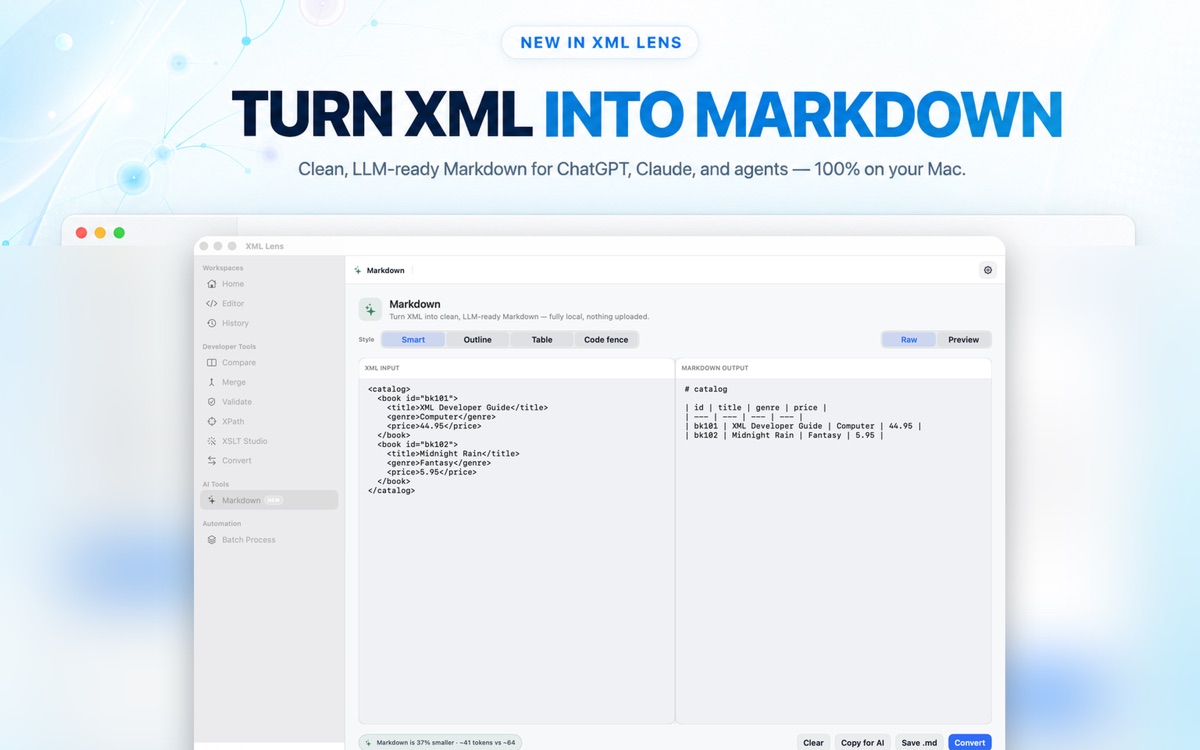
Choose the Markdown shape that fits the document
Open or paste XML, then choose how XML Lens should represent its structure. Smart selects a readable form for the document, Outline emphasizes hierarchy, Table works well for repeating records, and Code fence preserves the source as a fenced XML block.
The generated Markdown stays visible beside the XML so you can review headings, lists, tables, values, and nesting before copying or saving it.
- Smart output for a balanced, readable conversion
- Outline output for nested XML structure
- Table output for repeating records
- Code fence output when preserving XML source is the goal
Prepare XML context for LLMs and agents
Clean Markdown can be easier to paste into ChatGPT, Claude, coding agents, notes, and documentation than dense XML. XML Lens estimates output size and token count so you can compare the generated Markdown with the original before using it as context.
Copy the complete result, save it as a .md file, or copy only one branch from Visual Map when the full document would add unnecessary context.
- See estimated Markdown size and token count
- Copy Markdown directly to the clipboard
- Save the result as a local .md file
- Copy one Visual Map subtree as Markdown
A private Mac conversion workflow
XML-to-Markdown conversion runs locally in XML Lens 1.9 for macOS 14.0 or later. XML content, filenames, paths, and generated Markdown are not uploaded, and XML Lens does not collect product analytics.
Markdown is a simplified representation, not a lossless XML round trip. Review the generated output when namespaces, mixed content, comments, processing instructions, or exact ordering matter. The feature is available during the full trial and with the one-time Pro purchase.
- No file upload, account, or product analytics
- Review output before relying on it as an exact XML representation
- One-time Pro purchase through the Mac App Store
Frequently asked questions
How do I convert XML to Markdown on a Mac?
Open or paste XML in XML Lens, open the Markdown workspace, choose Smart, Outline, Table, or Code fence, then copy the result or save it as a .md file. Conversion happens locally on your Mac.
Does XML Lens upload XML when converting it to Markdown?
No. XML-to-Markdown conversion runs on the Mac. XML Lens does not upload XML content, filenames, paths, or generated Markdown, and it does not collect product analytics.
Which XML-to-Markdown output styles are available?
XML Lens provides Smart, Outline, Table, and Code fence styles. Smart chooses a readable representation, Outline emphasizes hierarchy, Table targets repeating records, and Code fence preserves XML source inside Markdown.
Can I use the Markdown with ChatGPT, Claude, or an AI agent?
Yes. Copy the generated Markdown for use as context in ChatGPT, Claude, coding agents, or documentation. XML Lens shows estimated token and size information, but you should still review the output and avoid sharing sensitive data with third-party services.
Can I convert only part of an XML document to Markdown?
Yes. In Visual Map, select the branch you need and copy that subtree as Markdown. This is useful when an LLM, agent, note, or document only needs one part of a larger XML file.
Is XML-to-Markdown conversion lossless?
No. Markdown does not represent every XML concept exactly. Review the output when namespaces, mixed content, comments, processing instructions, or exact ordering are important, and keep the original XML as the source of truth.