Visual XML map for Mac · New in XML Lens 1.6
See any XML document as an interactive map
XML Lens Visual Map turns an XML document into an interactive hierarchy of connected element cards on your Mac. Explore parent–child structure, namespaces, and values in one view, then reveal any node in source while the document stays local—no uploads and no product analytics.
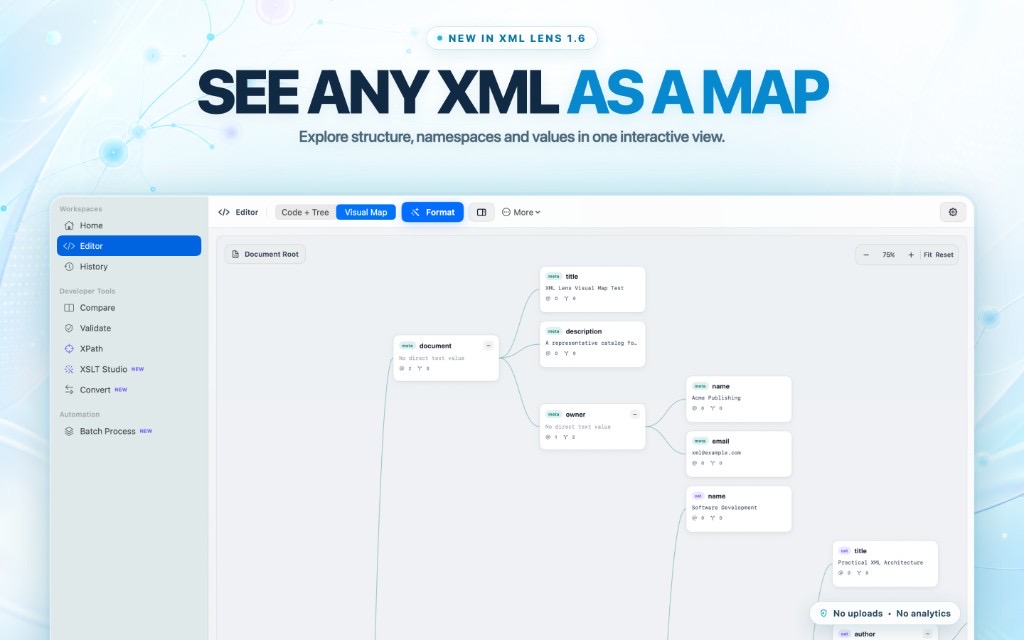
From dense markup to a readable hierarchy
Large XML files are hard to hold in your head as raw tags. Visual Map builds a left-to-right node-and-connector view of the open document so you can follow nesting, spot branches, and see value previews without scrolling through every line.
Each card can show namespace context, a value preview, attributes, and child counts—so structure and meaning stay visible together.
- Document-root to element cards with clear parent–child links
- Namespace labels and value previews on nodes
- Works on the same locally parsed document as the editor
Explore without losing your place
Pan and zoom the canvas, fit the full document, or reset the view when a branch gets wide. Collapse branches you do not need right now, then expand them again when you drill back in.
Click a node to inspect it. Double-click to reveal the matching element in source so the map and the markup stay connected.
- Pan, zoom, fit, and reset controls
- Collapse and expand branches without leaving the map
- Inspect nodes, then jump straight back to source
Built for private Mac workflows
Visual Map is part of XML Lens 1.9 for macOS 14.0 or later. It is a native desktop view—not a browser diagramming tool and not an online XML visualizer that requires a file upload.
XML content, filenames, and paths stay on your Mac. Use Visual Map beside the editor, structure tree, XPath runner, compare, merge, conversion, validation, and batch tools in one workspace.
- No uploads and no product analytics
- Switch between Code + Tree and Visual Map in the editor
- One-time Pro purchase through the Mac App Store
Frequently asked questions
What is a visual XML map on Mac?
A visual XML map shows an XML document as an interactive hierarchy of nodes and connectors instead of only as text. In XML Lens, Visual Map lets you pan, zoom, collapse branches, inspect values and namespaces, and reveal nodes in source on macOS.
Does Visual Map upload my XML?
No. Visual Map is generated locally from the open document. XML Lens does not upload XML content, filenames, or paths, and it does not collect product analytics.
Can I jump from a map node back to the XML source?
Yes. Inspect a node from the map, then double-click to reveal the matching element in the syntax-highlighted editor so structure and source stay synchronized.
Is Visual Map only a screenshot feature?
No. The App Store artwork shows the real Visual Map workspace shipping in XML Lens 1.6: interactive cards, zoom controls, editor view switching, and local processing.
Which macOS version do I need?
XML Lens requires macOS 14.0 or later. Visual Map is included in the current app version 1.9.