XSD Viewer for Mac · New in XML Lens 1.9
View and format XML Schema (XSD) locally on Mac
XML Lens includes a native XSD Viewer for inspecting an XML Schema on your Mac. Browse elements, types, attributes, groups, and globals beside syntax-highlighted source, then search, format, minify, compile, and save without uploading the schema or changing the XML document open in the Editor.
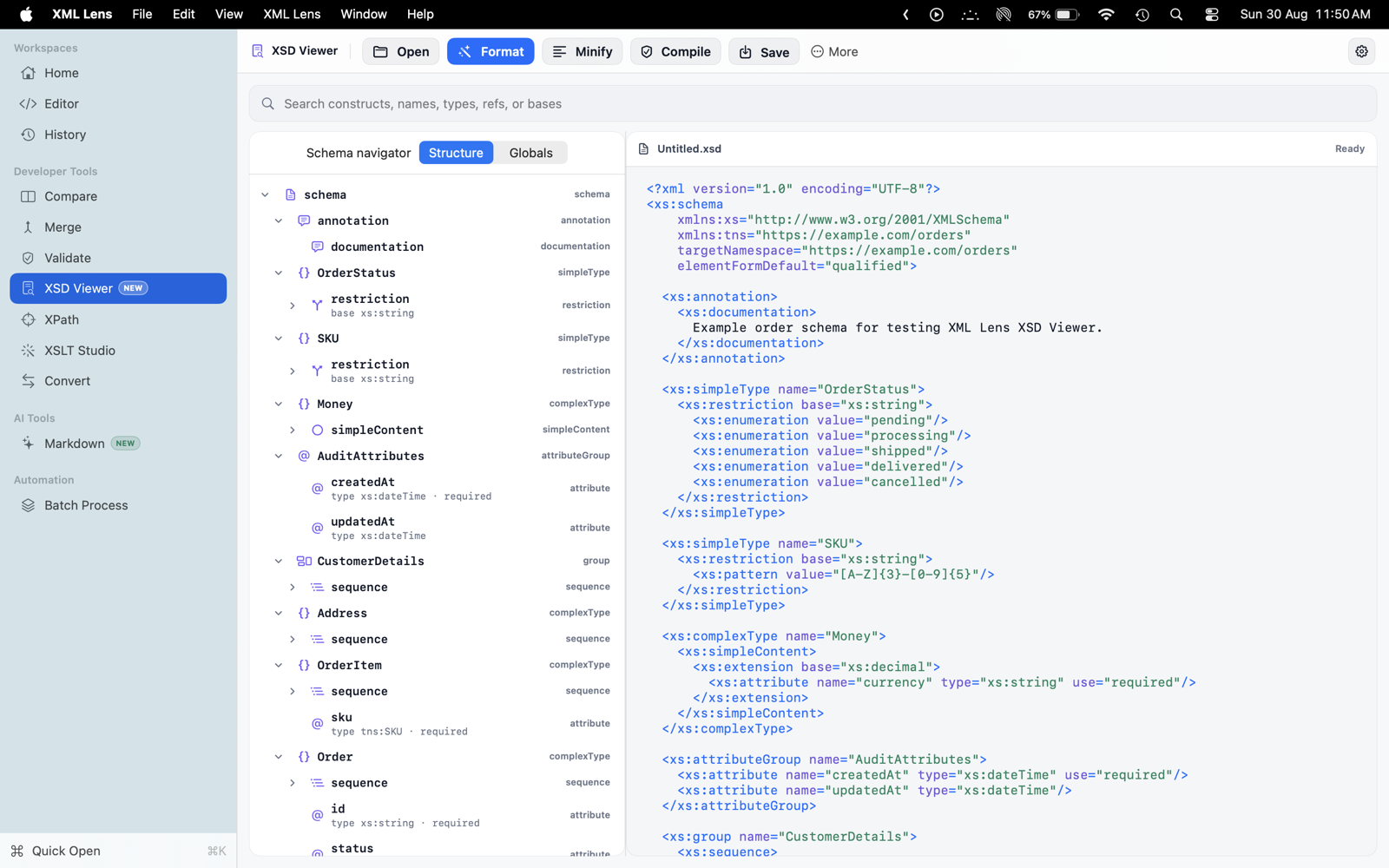
Browse the schema instead of scanning raw markup
Open, paste, or drag an .xsd file into a dedicated workspace. XML Lens builds a namespace-aware navigator for schema elements, simple and complex types, attributes, groups, and occurrence rules while keeping the source visible beside it.
Use the Globals view to focus on top-level declarations, or select a construct in the tree to reveal its source context.
- Expandable structure tree for XSD constructs
- Global declaration browsing for named schema components
- Source context for elements, types, attributes, and groups
- Dedicated workspace that does not replace the open XML document
Search declarations and compile with visible diagnostics
Search construct names, types, references, and base types across the schema. Compile the open self-contained schema to catch structural issues, then review diagnostics with source context before saving or using it for XML validation.
Compilation is intentionally scoped to the open schema. XML Lens 1.9 does not resolve xs:include or xs:import dependencies and does not claim XSD 1.1 support.
- Search names, types, refs, and bases
- Compile a self-contained schema locally
- Review diagnostics without an online XSD tool
- No xs:include or xs:import resolution in version 1.9
Format, minify, edit, and save locally
Pretty-print a compressed schema for review, minify it for compact storage, edit the syntax-highlighted source, and save the result as an .xsd file. These actions apply only to the XSD workspace, so switching to the schema does not overwrite the current XML Editor document.
XSD Viewer is part of XML Lens 1.9 for macOS 14.0 or later. Schema content, filenames, paths, searches, and diagnostics stay on the Mac, and XML Lens does not collect product analytics.
- Format or minify XSD source
- Open, paste, drag, edit, and save .xsd files
- Schema state stays isolated from XML Editor state
- Local processing with no file uploads
XSD Viewer and XML validation solve different jobs
Use XSD Viewer when you need to understand, search, edit, format, or compile the schema itself. Use Validate when you need to check whether an XML document conforms to a selected XSD. The two workflows remain separate so schema exploration never replaces the XML document under review.
Frequently asked questions
Can I view and format an XSD file on a Mac?
Yes. Open, paste, or drag an .xsd file into XML Lens XSD Viewer to browse its structure beside syntax-highlighted source, then format, minify, edit, compile, or save it locally.
What is the difference between XSD Viewer and Validate?
XSD Viewer helps you inspect and work on the schema itself. Validate checks whether an XML document conforms to a selected XSD. The XSD workspace is isolated, so opening a schema does not replace the XML document in the Editor.
Does XML Lens upload my XSD schema?
No. XSD source, filenames, paths, searches, and compile diagnostics stay on your Mac. XML Lens does not upload schemas and does not collect product analytics.
Does XSD Viewer resolve xs:include or xs:import?
No. XML Lens 1.9 compiles the open self-contained schema and does not resolve xs:include or xs:import dependencies. It also does not claim XSD 1.1 support.
Can XSD Viewer generate sample XML or a schema map?
Not in version 1.9. XSD Viewer provides a structure tree, globals, search, source editing, formatting, minification, and self-contained compilation; it does not generate sample XML or render a Visual Map of the schema.